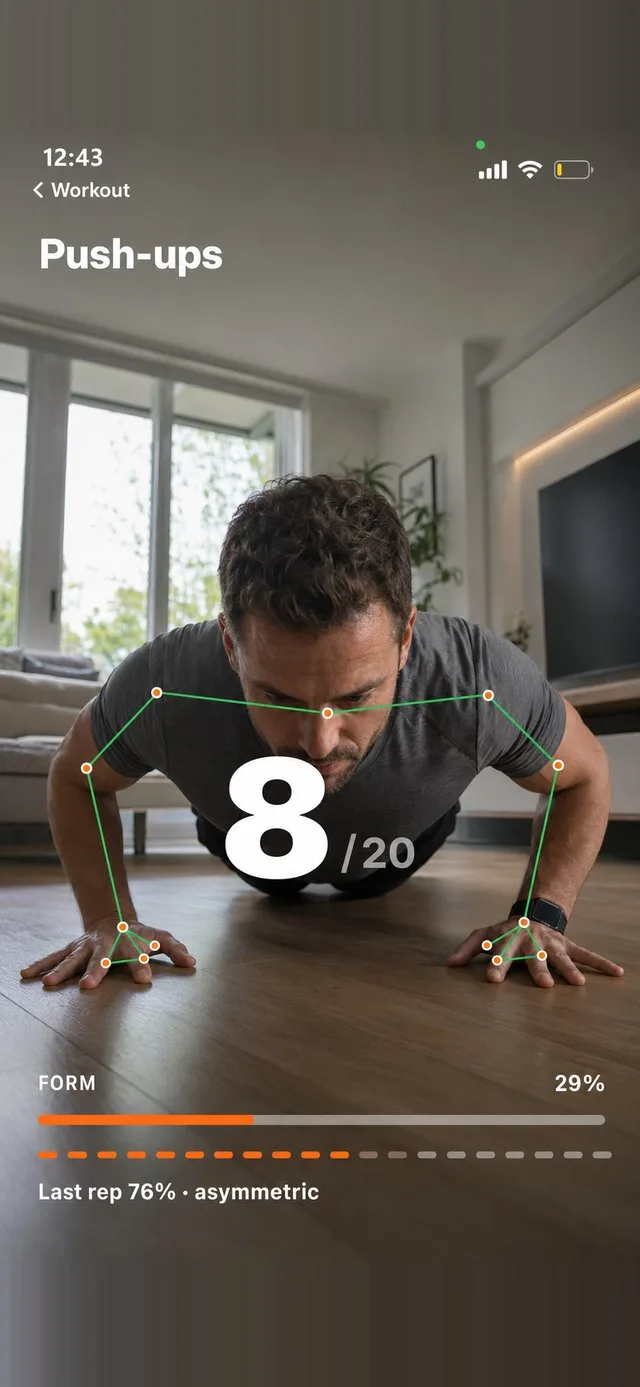
An ordinary alarm asks you for one thing: a tap. Tapping is something you can do with your eyes shut, one arm out from under the duvet, while the rest of you stays horizontal and asleep. That is the whole problem. The dismissal action costs nothing, so it gets performed by the part of your brain that is still off duty, and ten minutes later you have no memory of doing it.
Alarm apps that make you exercise attack that gap directly. Instead of a tap, the alarm demands a physical task: a set of press-ups, twenty squats, thirty jumping jacks, a walk of fifty steps. The alarm keeps sounding until the task is finished. You cannot delegate it to a half-conscious thumb, because a squat is not something a half-conscious body performs.
Why physical dismissal beats a maths puzzle
The first generation of "hard to dismiss" alarms used cognitive tasks. Solve three sums. Retype a string of characters. Scan a barcode in the bathroom. These are better than a tap, and the barcode one in particular works for some people because it involves walking. But cognitive tasks have two weaknesses.
The first is that you can do them badly and still get through. Sleep inertia does not stop you adding 47 and 18; it just makes you slow. Plenty of people report solving the puzzle in a fog, dismissing the alarm and going straight back under. The task was completed by a brain that was never really online.
The second weakness is that a maths puzzle does nothing to your body. This is the part most people miss. Waking up properly is not a decision, it is a physiological transition, and the two levers that actually move it are heart rate and core body temperature. Both drop overnight and both need to come back up. Movement raises them fast. Thirty seconds of jumping jacks will do more to shift you out of sleep inertia than five minutes of staring at arithmetic, because it is operating on the mechanism rather than on your willpower.
There is also the simple postural fact. You cannot do a squat lying down. The exercise forces you upright and out of bed as a side effect, and once you are standing in the middle of the room the decision to go back to bed has to be made deliberately rather than by default. That is a much harder decision to make.
The point is not that the exercise is a punishment. The point is that the exercise is the thing that wakes you, and dismissing the alarm is the side effect.
What separates a good one from a gimmick
The category has a wide quality range. Several apps in the App Store advertise "exercise to dismiss" and deliver something considerably less rigorous. Here is what to actually check.
Does it verify the movement or just count phone shakes
This is the biggest divide. Many so-called exercise alarms use the accelerometer, which means they are counting shakes, not reps. Hold the phone and flap your wrist thirty times and the alarm stops. You have not exercised. You have not stood up. You have learned, within about two mornings, that the app is beatable from bed, and once you know that the app is finished as a tool.
The alternative is camera based pose detection. The phone watches you through the front camera and tracks your skeleton in real time as a set of body points. FitClock uses on-device pose detection across 33 body points, which means it is not only counting reps but scoring them for depth, tempo and form. A half press-up where your chest never approaches the floor does not register. Neither does a squat you bounce through at double speed. That distinction matters more than it sounds, because the moment an app can be cheated, you will cheat it, and you will do so at 6am when your judgement is at its worst.
Does it ring through Silent mode and Focus
An alarm that can be silenced by a switch on the side of your phone is not an alarm. Historically this was the great weakness of third party alarm apps on iPhone, which is why they got a reputation for letting people down. FitClock rings through Silent mode and Focus the same way the built in Clock app does. More on that in our piece on whether an iPhone alarm rings on Silent or Do Not Disturb.
When you are comparing apps, this is a hard filter. If the app does not say explicitly that it rings through Silent mode, assume it does not.
Does it get harder over time
Ten press-ups is a meaningful obstacle in week one. By week six it is a formality you can perform badly while still mostly asleep. Any exercise alarm with a fixed target has a shelf life, and once you cross that line it degrades back into a slightly annoying tap.
Look for a progression system. FitClock uses an eight week ramp that raises your rep target as you get stronger, so the task stays roughly as demanding in month two as it was on day one. The absolute number is not the point. The point is that the difficulty tracks your capability instead of sitting still.
Is there variety, or the same task every day
Habituation is not only physical. Doing the identical sequence every morning makes it automatic, and automatic is exactly what you are trying to avoid. Apps that let you enable a pool of exercises and then randomise which one you get each morning keep a small element of surprise in the routine. Ten options (press-ups, squats, jumping jacks, sit-ups, lunges, burpees, mountain climbers, high knees, a plank hold, fifty steps) is enough to prevent the sequence becoming pure muscle memory.
Where does the camera footage go
You are pointing a camera at yourself in your bedroom, first thing, in whatever you sleep in. Check what happens to that video. The correct answer is that processing happens entirely on the device and nothing is transmitted anywhere. Be sceptical of any app in this category that requires an account, because an account implies a server, and a server implies data leaving your phone. FitClock uploads nothing, has no accounts and runs no analytics, which you can read more about on the FitClock homepage.
Who this actually helps
Exercise alarms are not for everyone. If you wake naturally before your alarm most days, you do not need one and you will find it irritating. The people it works for are the ones who have already tried the standard advice and found it insufficient: the ones who snooze five times, who set four alarms and sleep through all of them, who have moved the phone across the room and simply learned to walk over, tap it, and walk back. If that description fits, our guide on how to stop hitting snooze covers the behavioural side in more depth.
The other honest caveat is that no alarm fixes insufficient sleep. If you are consistently getting six hours, a set of burpees will get you vertical but you will be running a deficit all day regardless. An exercise alarm makes the wake-up reliable. It does not make it pleasant if the underlying schedule is wrong.
What it does do, for the right person, is remove the single decision that has been costing you an hour every morning. There is no negotiation at 6am, because the alarm is not asking for your agreement. It is asking for twenty squats, and it will keep asking until it gets them.
An alarm you cannot tap away
FitClock rings through Silent mode and keeps ringing until the camera counts real reps with real form.
Get FitClock